Now in Kanban Studio: public boards
You can now share boards with a public link to show progress, roadmap updates, and current work status without access friction.
Today we are announcing one of the most requested updates in Kanban Studio: public boards. If you need to share progress with clients, community members, partners, or stakeholders, you can now do it directly with a link.
Before this release, that flow often ended in screenshots, scattered messages, or extra sync meetings. Starting now, you can show real board status without the extra noise.
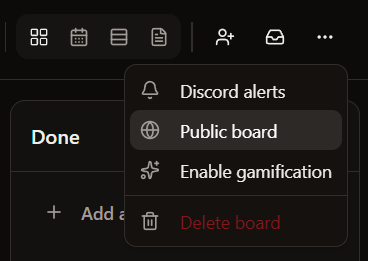
What this unlocks right now
- You can enable a public version of your board with a shareable link.
- Anyone with the link can view the board and understand work status immediately.
- Sharing roadmap updates and execution progress is now simpler, clearer, and faster.
Where teams will feel it most
The main gain is shared clarity with less friction. When you collaborate with people outside your day-to-day workspace, you can show real progress without extra meetings or long message threads. This cuts back-and-forth, improves alignment, and makes progress visible to the people who need to see it.
What comes next
We will keep improving this experience so sharing work feels even more natural. In upcoming updates, we will continue polishing the publishing flow and the reading experience for external audiences.
Related guides
Continue with closely related reads without breaking your workflow.
A clearer experience in settings, board, and profile
We reorganized key app areas so navigation and configuration feel more direct and less confusing.
ReadWe launched the new Kanban Studio blog
This is our new space to share product updates in a clear, concise, and consistent way.
ReadNew user identity with a unique userTag
We improved user identity so every profile is clearer, easier to recognize, and more consistent across the platform.
Read